Showing posts with label Xiaomi Redmi 3S /Prime /3X ROMs. Show all posts

Saturday, November 25, 2017

How To Install Miui 9 On Redmi 3S/Prime/3X|stock rom go to rompure.com

How To Install Miui 9 On Redmi 3S/Prime/3X


Hello Guys In this video i am going to show you How To Install Miui 9 On Redmi 3S/Prime/3X. So guys finally we got Miui 9 Globle Devloper Rom for our Redmi 3S /Prime /3X users. So guys watch this full video till the end then you properly understand all installation proces of Miui 9 On Redmi 3S users.

ALLSO READHow To Install Android O (Oreo) 8.0.0 In Redmi 3S/Prime/3X

Miui 9 Changelog :

Highlights
New - Mi Picks gets a new name and a new icon! Meet Apps!

System
Fix - Only Mi TV/Mi Box can be added/shown on Mi Remote app after the update.

Lockscreen, Status Bar, Notification Bar
Fix - Wallpaper Carousel couldn't load online resources (a Play Store update was required)

Themes
Optimization - Redesigned home page

Other
New - Mi Picks gets a new name and a new icon! Meet Apps!

ALLSO READOfficial Resurrection Remix N For Redmi 3S/3X/Prime Nougat 7.1.2 ROM

REQUIREMENTS For installing Miui 9 On Redmi 3S/Prime /3X :

1. Unlocked Bootloader.

2. TWRP Recovery Installed On your Redmi 3S /Prime /3X.

3. Download Miui 9 Full Rom file.

4. Download Lazy Flasher Zip file.

ALLSO READLineageOS 14.1 for Redmi 3s/Prime/3X Nougat 7.1 ROM

Step By Step Tutorial To Install Miui 9 On Redmi 3S/Prime /3X :

1. Unlocked Bootloader Needed. If you don't know how to unlock bootloader on any Xiaomi deivce the watch this tutorial video or follow the full tutorial post. (which may VOID your warranty and may delete all your data. SO first Take a full backup of your all data).


2. Need Latest custom Recovery installed (Like CWM OR TWRP). If you don't know how to install custom recovery on your Redmi 3S /Prime /3X then watch this video tutorial or follow the post link.


3. First Take a full backup of your current rom using TWRP recovery.

4. Download Miui 9 Rom file & Lazy flasher zip file and save it in your phone Storage.

5. Boot Your phone into Twrp Recovery mode for that Press Volume Up + volume Down + Power At the same time.

6. Go to Wipe section and Wipe data factory reset, Cache partition, Dalvik Cache and Format the System partition.

7. Now Click on install section and select Miui 9 Rom and flash it.

8. After flashing Miui 9 Go back and select Lazy flasher zip file and flash it.

9. Now click on Reboot System. It will take some time to first Boot.

10. Done. Now Miui 9 Installed on your Redmi 3S/Prime /3X.

ABOUT ME :

I Make Tech Videos Based Around SmartPhones especially Android Devices
Easy To Use Tutorials,Cool Android Tips & Tricks,Games & Apps Reviews.I Also show case interesting accessories & Gadgets

So what are you waiting for S-U-B-S-C-R-I-B-E and Join the best Android Tips and Hacks Channel On Youtube

Mahesh Technicals

ALLSO READLineage OS 15 for Redmi 3s / Prime /3X – Android Oreo 8.0 ROM

Download Miui 9 Full Rom file for Redmi 3S/Prime /3X + Lazy Flasher file:

1. Download Miui 9 Full Rom file.

LINK - 1:

Download  Miui 9 for Redmi 3S/Prime /3X

LINK-2:
 Download Miui 9 for Redmi 3s/Prime /3X


2. Download Lazy Flasher Zip. 

LINK - 1:
 Download Lazy Flasher zip For Redmi 3S

LINK - 2:
  Download Lazy Flasher zip For Redmi 3S


Thank You For Reading How To Install Miui 9 On Redmi 3S/Prime/3X. 

Friday, November 24, 2017

How To Install GZOSP Android O (Oreo) 8.0 In Redmi 3S/Prime/3X|stock rom go to rompure.com

How To Install GZOSP Android O (Oreo) 8.0 In Redmi 3S/Prime/3X

How To Install GZOSP Android O (Oreo) 8.0 In Redmi 3S/Prime/3X
GZOSP Android O (Oreo) 8.0 ROM For  Redmi 3S/Prime/3X

Finally We got Android Oreo 8.0 GZOSP Rom For our Redmi 3S/3X/Prime. In this post I am going to teach you How to download and install Android O (Oreo) 8.0 ROM On Redmi 3S /Prime /3X (land). Here comes the GZOSP Rom for Redmi 3s/Prime/3X via an unofficial build.This Redmi 3s/Prime GZOSP Rom (land) is brought to you BY t0rqu3 & hridayhs


What Is GZOSP ROM?? 


GZOSP is Ground Zero Open Source Project our 8.0 base we use for other projects, e.g. Validus
Not much features will be added, only basics and aosp patches will be merged.
It's open source and buildable for anyone, builds from it already started popping up, so we decided to allow it
and to avoid the constant pm's with build questions we decided to create this thread, so maybe people will
help each other some.
Isn't that a novel idea.


DISCLAIMER:

If You Do Wrong Steps Then You Brick Your Device So I AM NOT RESPONSIBLE FOR ANY DAMAGES OF YOUR PHONE DO DO IT AT YOUR OWN RISK. 


Status of GZOSP Rom For Redmi 3S/3X/Prime (land) Oreo 8.0 ROM

WHAT’S WORKING:
– Not Known

KNOWN ISSUES:
– Not Known

ALLSO READ : How To Install Miui 9 On Redmi 3S/Prime/3X

Requirements For Installing a custom ROM on a Redmi 3s/Prime/3X (land):

1. Unlocked Bootloader Needed. If you don't know how to unlock bootloader on any Xiaomi deivce the watch this tutorial video or follow the full tutorial post. (which may VOID your warranty and may delete all your data. SO first Take a full backup of your all data).


2. Need Latest custom Recovery installed (Like CWM OR TWRP). If you don't know how to install custom recovery on your Redmi 3S /Prime /3X then watch this video tutorial or follow the post link.


3. GZOSP Android oreo Rom for Redmi 3s/Prime/3X zip file. (Download this file from the link given below).

4. Gapps For Android oreo Rom (Arm64) (Download from the given links below)


How To Install Android O (Oreo) 8.0 In Redmi 3S/Prime/3X

1. First take a full backup of your current rom in to your pc.

2. Download GZOSP Android oreo Rom for Redmi 3s/Prime/3X zip file and Download Gapps for Android oreo rom from the given links on your pc.

ALLSO READ : Lineage OS 15 for Redmi 3s / Prime /3X – Android Oreo 8.0 ROM

3. Boot your phone into recovery mode using key combinations like Turn off your Redmi 3S /Prime /3X Phone and press Volume up + volume Down + power key At the same. When the Mi logo spear release the keys.

4. Go to Wipe section and Wipe data factory reset, Cache partition, Dalvik Cache and Format the System partition.

5. Now move your files from the pc (GZOSP Android oreo Rom file and Gapps)

6. Now go to install section and select GZOSP Android oreo rom file and flash it. It will take some time to flash.

7. After flashing rom don't reboot your phone. So go back and again go to install option and select Gapps zip file and flash it.

8. Now reboot your phone. It will take some time to first hoot. (5-10 minutes)

. 9. Now finally Android O (Oreo) installed on your Redmi 3S /Prime /3X.

9. Done & Enjoy.


How To Root Android O (Oreo) ROM :

1. Download Supersu zip file from the given link.

2. Flash supersu zip file from the TWRP Recovery.

. 3. Done. Now your Android O (Oreo) 8.0 Rom is successfully Rooted.


Download Rom & Gapps & Supersu zip File 

1. Download GZOSP Android O (Oreo) 8.0 For Redmi 3S/Prime/3X ROM zip File (Download Latest Build) :

LINK - 1:
Download Android Oreo Rom for redmi 3S/Prime /3X

LINK - 2:
Download Android Oreo Rom for redmi 3S/Prime /3X


2. Download Gapps For Android O (Oreo) ROM :

LINK - 1:
Download Gapps For Redmi 3S /Prime/3X

LINK - 2:


3. Download Supersu Zip

LINK - 1:
Download Supersu Zip file.

LINK - 2:
Download Supersu Zip file.


Credits :

Thank You For Reading  How To Install GZOSP Android O (Oreo) 8.0 In Redmi 3S/Prime/3X. 

Thursday, November 23, 2017

How To Install TWRP Recovery On Redmi 3S/Prime/3X|stock rom go to rompure.com

How To Install TWRP Recovery On Redmi 3S/Prime/3X


Hello guys In this video i am going to show you How To Install TWRP Recovery On Redmi 3S/Prime/3X. So guys Redmi 3S/Prime /3X it has same software build and chipset. That's why this trick works on Redmi 3S /Prime /3X as well (100% working method) . So guys today we will install twrp recovery on Redmi 3S /Prime /3X , and root our phone. So follow all the steps properly then you understand How To Install TWRP Recovery On Redmi 3S/Prime/3X. 

Xiaomi Redmi 3S/Prime /3X

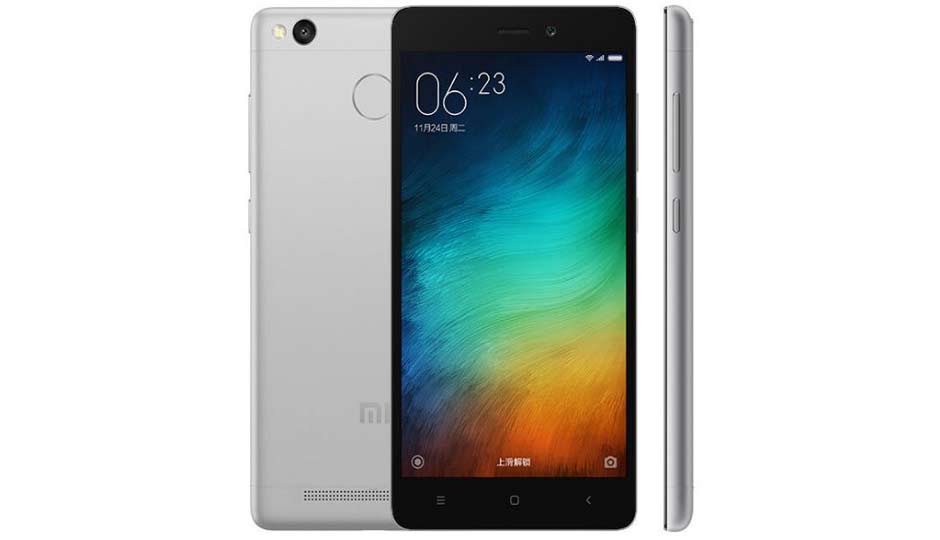
Released in June 2016, the Xiaomi Redmi 3S/Prime /3X is a budget device which packs in reasonable hardware specifications for the cost. Processing power is supplied courtesy of a Qualcomm Snapdragon 430 SoC, which comprises of a 1.4 GHz octa-core CPU, an Adreno 505 GPU and 2 GB of system RAM. The 16 GB /32 GB of internal storage can be expanded thanks to 256 GB microSD card support. Enclosed within the 144g chassis sits a 5" 720P IPS LCD display, which offer a pixel density of ~294 PPI. 

TWRP Recovery For Redmi 3S/Prime/3X


TWRP is an open source, community project.custom recovery is used for installing custom software on your device. This custom software can include smaller modifications like rooting your device or even replacing the firmware of the device with a completely custom "ROM" like OmniROM

How To Install TWRP Recovery On Redmi 3S/Prime/3X

REQUIREMENTS :

1. First unlocked Bootloader Of your phone. If you don't know how to unlock bootloader then watch this video tutorial. 

How To Unlock Bootloader Of Redmi Note 3 :


2. PC / computer running windows. 

3. TWRP Redmi 3S zip file. 

4. Supersu. Zip file. 

5. Redmi 3S /Prime /3X. (Don't try this on other phone) 


NOTE : I AM NOT RESPONSIBLE FOR ANY DAMAGES OF YOUR PHONE. SO IF YOU WANT TO DO THEN DO IT AT YOUR OWN RISK. 

STEP BY STEP TUTORIAL :

1. First unlock your Redmi 3S/Prime/3X bootloader. 

2. After unlocking bootloader, go to Phone settings /About Phone /Miui verson. Tap 7 to 8 times on miui verson. Then go back and go to "Aditional settings /Devloper option. And enable" OEM Unlocking” and USB Dibuging”. 


3. Now power off your Redmi 3S/Prime/3X, and boot your phone into "Fastboot Mode" for that use krys combinations like,press Volume Down + power key at the same time then you will see like this. 


4. Now conect your phone to pc /computer via USB cable. (use better USB cable) 

5. Now download "TWRP Redmi 3S. Zip  and Supersu.zip" Download both files from the given links below & and save it in to your pc. 

6. Now "Extract TWRP Redmi 3S. Zip file" using "winrar or 7zip. 

7. Now after extracting it, your will get folder called TWRP Redmi 3S". So open this folder and first install "Fastboot.exe" after that run adb file from this TWRP Redmi 3S. This proces install all the required drivers in your pc which is use for installing twrp on redmi 3S/Prime /3X. 

8. Now press SHIFT +Right click /open command window. And type "fastboot devices" and press enter it will show your phone properly connected or not. If you see this numbers that means your phone is connected properly and drivers are installed properly. 


9. After your phone connected properly then again open "TWRP Redmi 3S folder there you find" TWRP installer.bat" file. Dable click on that. 


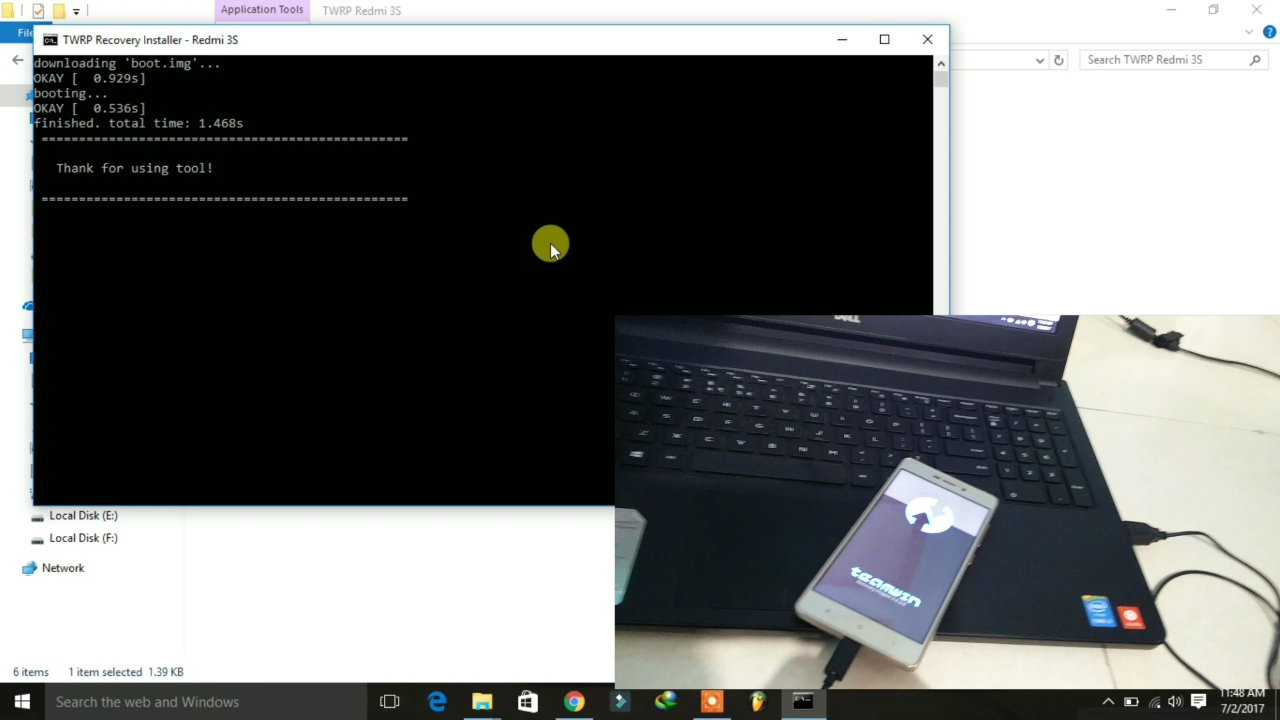
10. It will open like this then only press enter 3 times. 


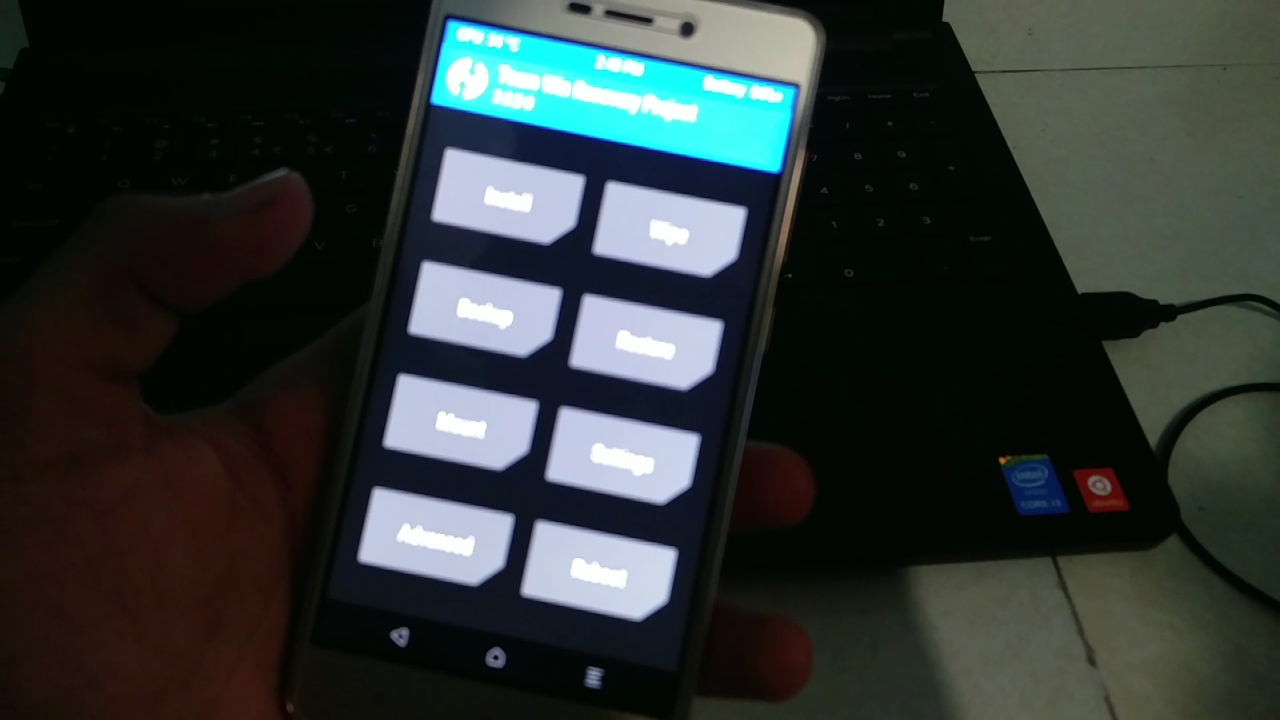
11. Now your phone will boot automatically in twrp recovery mode. see your twrp recovery is installed on your phone like this. 

12. Now you will this fist scren so swipe it. 


13. Now don't disconnect your phone. Now we root our phone. Now coppy your "Supersu. Zip file into your phone memory.

14. Now take your phone and tap on install section and select your supersu.zip file and flash it. It will take some time to flash so wait. 


15. Now you will see like this. Don't reboot your system. Now Go back 2 times or go to home of your TWRP recovery. And click on "advanced" then click on "Dm verify" and swipe it. If you not do this then your phone will not boot. So do this step. 


16. Now click on Reboot System" Done, now your phone boot fine it will take time up to 10 to - 15 minutes so wait. After that your Redmi 3S/Prime/3X sucrosefully Rooted & TWRP Recovery installed. 

ABOUT ME :

I Make Tech Videos Based Around SmartPhones especially Android Devices
Easy To Use Tutorials,Cool Android Tips & Tricks,Games & Apps Reviews.I Also show case interesting accessories & Gadgets 

So what are you waiting for S-U-B-S-C-R-I-B-E and Join the best Android Tips and Hacks Channel On Youtube

Mahesh Technicals

Download Links :

1. TWRP Redmi 3S zip file. 

LINK - 1:


LINK - 2:


2. Supersu . zip 


LINK - 1:


LINK - 2:


3. ADB/Fastboot drivers setup (Additional If your phone not detect by PC):

LINK - 1:


LINK - 2:


Thanks For Reading How To Install TWRP Recovery On Redmi 3S/Prime/3X. 

                                                      By - Mahesh Technicals

Tuesday, November 14, 2017

How To Install Dolby Atmos In Any Xiomi /Redmi Devices|stock rom go to rompure.com

How To Install Dolby Atmos In Any  Xiomi /Redmi Devices


Dolby Atmos In Any  Xiomi /Redmi Devices

Hello guys I this video i am going to show you how to install or Flash dolby atmos on any Xiaomi phones. So guys this is a very in trusting video. If you don't know about Dolby Atmos, so guys guys dolby atmos it is a sound ewuiliser made by Lenovo. So its improve your sound quality in your phone or increse your music sound with great ewuiliser. So guys I recommend you to use dolby atmos on your phone and I allso personality use this dolby atmos ewuiliser on my phone. 

DOLBY ATMOS :


Best Sound output in ANDROID, 
While Performance, battery life of an Android device matters for few, Sound output also plays a crucial role in judging a phone. Most of the people prefer Sony Smartphones because of its Walkman music. Most of the time you might experience low sound issues after installing any custom ROMs. Today in this articles, we’ll checkout Dolby Atmos for any Android device running Jellybean, Kitkat, Lollipop & Marshmallow.

Manufacturers don’t provide entire access of the hardware functionality. Like, you can increase the vibration intensity,overclock CPU & much more by rooting your Android device. Similar to this, you can also increase your device’s sound output. It will not only increase sound but will also make it much clear and crisp. Lets get started with Installing Dolby Atmossystem in any Android device.

So guys if you want to install "Dolby Atmos" on Any Xiaomi phones then you will need some requirements for that, 


NOTE : I AM NOT RESPONSIBLE FOR ANY DAMAGES OF YOUR PHONE. SO IF YOU WANT TO DO THEN DO IT AT YOUR OWN RISK. 


REQUIREMENTS :

1. Any  Xiomi /Redmi Device

2. Unlocked Bootloader 

3. Rooted Phone. 

4. Installed  custom recovery (TWRP or any other) 

5. Dolby flashable zip 

6. Dolby Uninstaller zip (if your phone going to Bootloop then you required this file) 

How To Install Dolby Atmos In Any  Xiomi /Redmi Devices

STEP BY STEP TUTORIAL :

1. First you need unlock bootloader of your Xiomi phones, if you don't know about unlocking then watch this video.  (FULL GUIDE)


2. Now you need rooted phone with TWRP Recovery installed, if you don't know what to install twrp & root then watch this video.  (FULL GUIDE)


3. Now after 2 steps now you need to download "Dolby Atmos zip" file from the given links. And allso download Dolby Uninstaller zip (if your phone going to Bootloop then you required this file),save it on your internal memory. 

4. Now boot your phone into "Recovery mode. For that press" Volume up +Down +power key at the same time. (if this key combinations is not working on your phone then go to Google and surch your phones recovery mode keys) 


5. Now first Click on backup and take a full backup of your current rom, in the case any problem within the flashing then you essyly restore it like before. 

6. After backup, now click on install button and select your "Dolby Atmos zip" and flash it. 


7. Now click on "System Reboot" it will take 5-15 minutes to boot so wait. 


8. Done. After booting you will find new app installed on your phone which is a Dolby Atmos so open it and enjoy. 


Uninstall Dolby Atmos :

In the case if you don't want this dolby or you not like it then follow this steps to Uninstall it. 

1. Download Dolby Atmos uninstaller zip file. 

2. Flash via TWRP recovery. 

3. Done. 

ABOUT ME :

I Make Tech Videos Based Around SmartPhones especially Android Devices
Easy To Use Tutorials,Cool Android Tips & Tricks,Games & Apps Reviews.I Also show case interesting accessories & Gadgets 

So what are you waiting for S-U-B-S-C-R-I-B-E and Join the best Android Tips and Hacks Channel On Youtube

Mahesh Technicals

DOWNLOAD FILES :

1. Dolby Atmos zip

LINK - 1:


LINK - 2:


2. Dolby Atmos Uninstaller zip. 

LINK - 1:


LINK - 2:


Thank You For Reading How To Install Dolby Atmos In Any  Xiomi /Redmi Devices. 

                                                       By - Mahesh Technicals

Monday, November 13, 2017

How To Install Android O (Oreo) 8.0.0 In Redmi 3S/Prime/3X|stock rom go to rompure.com

How To Install Android O (Oreo) 8.0.0 In Redmi 3S/Prime/3X


Finally We got Android Oreo 8.0.0 XPerience Rom For our Redmi 3S/3X/Prime. In this post I am going to teach you How to download and install Android O (Oreo) 8.0.0 ROM On Redmi 3S /Prime /3X (land). Here comes the XPerience Rom for Redmi 3s/Prime/3X via an unofficial build.This Redmi 3s/Prime/3X  XPerience Rom (land) is brought to you by TeamMex

What Is XPerience ROM?? 


XPerience is a free, community built distribution of Android 8.0.0 (oreo) which greatly extends the capabilities of your phone.
This project are based on AOSP CAF

DISCLAIMER:


If You Do Wrong Steps Then You Brick Your Device So I AM NOT RESPONSIBLE FOR ANY DAMAGES OF YOUR PHONE DO DO IT AT YOUR OWN RISK. 

Status of XPerience Rom For Redmi 3S/3X/Prime (land) Nougat 8.0.0 ROM

WHAT’S WORKING:
– Not Known (XDA)

KNOWN ISSUES:
– Not Known (XDA)

Requirements For Installing a custom ROM on a Redmi 3s/Prime/3X (land):

1. Unlocked Bootloader Needed. If you don't know how to unlock bootloader on any Xiaomi deivce the watch this tutorial video or follow the full tutorial post. (which may VOID your warranty and may delete all your data. SO first Take a full backup of your all data). 


How To Unlock Bootloader Of Redmi Note 3

2. Need Latest custom Recovery installed (Like CWM OR TWRP). If you don't know how to install custom recovery on your Redmi 3S /Prime /3X then watch this video tutorial or follow the post link. 


How To Install TWRP Recovery On Redmi 3S/Prime/3X

3. UnOfficial XPerience Android oreo Rom for Redmi 3s/Prime/3X zip file. (Download this file from the link given below). 

4. Gapps For Android oreo Rom (Arm64) (Download from the given links below) 

MUST WATCH :LINEAGE OS 15 FOR REDMI 3S / PRIME /3X – ANDROID OREO 8.0 ROM

How To Install Android O (Oreo) 8.0.0 In Redmi 3S/Prime/3X

1. First take a full backup of your current rom in to your pc. 

2. Download UnOfficial XPerience Android oreo Rom for Redmi 3s/Prime/3X zip file and Download Gapps for Android oreo rom from the given links on your pc. 

3. Boot your phone into recovery mode using key combinations like Turn off your Redmi 3S /Prime /3X Phone and press Volume up + volume Down + power key At the same. When the Mi logo spear release the keys. 

4. Go to Wipe section and Wipe data factory reset, Cache partition, Dalvik Cache and Format the System partition.

5. Now move your files from the pc (XPerience Android oreo Rom file and Gapps

6. Now go to install section and select XPerience Android oreo rom file and flash it. It will take some time to flash. 

7. After flashing rom don't reboot your phone. So go back and again go to install option and select Gapps zip file and flash it. 

8. Now reboot your phone. It will take some time to first hoot. 

. 9. Now finally Android O (Oreo) installed on your Redmi 3S /Prime /3X. 

9. Done & Enjoy. 

MUST WATCH :Official Resurrection Remix N For Redmi 3S/3X/Prime Nougat 7.1.2 ROM

NOTE :

if you face problem in Twrp recovery while flashing this rom then follow this step to fix this issue :

1. Go and extract this rom zip file using Phone or pc. 

2. Open extracted folder and go to META-INF/com/google/android/updater-script

3. Open this "updater-script" in text editor. 

4. Now remove some script from it and save it. Remove the below script :

ifelse(is_mounted("/system"), unmount("/system")); package_extract_dir("install", "/tmp/install"); set_metadata_recursive("/tmp/install", "uid", 0, "gid", 0, "dmode", 0755, "fmode", 0644); set_metadata_recursive("/tmp/install/bin", "uid", 0, "gid", 0, "dmode", 0755, "fmode", 0755); show_progress(0.750000, 0);

5. Save it and again make this all file as zip using Android or pc.

6. Now done flash this new zip file using TWRP recovery on Redmi 3S /Prime /3X. 


How To Root Android O (Oreo) ROM :

1. Download Supersu zip file from the given link. 

2. Flash supersu zip file from the TWRP Recovery. 

. 3. Done. Now your Android O (Oreo) 8.0.0 Rom is successfully Rooted. 

MUST WATCH :LineageOS 14.1 for Redmi 3s/Prime/3X Nougat 7.1 ROM

SCREENSHORTS :


Download Rom & Gapps & Supersu zip File 

Download Android O (Oreo) 8.0.0 For Redmi 3S/Prime/3X ROM zip File (Download Latest Build) :

LINK - 1:


LINK - 2:


Download Gapps For Android O (Oreo) ROM :

LINK - 1:


LINK - 2:


Download Supersu zip File:

LINK - 1:


LINK - 2:


Credits :
TeamMex
XDA

ABOUT ME :

I Make Tech Videos Based Around SmartPhones especially Android Devices
Easy To Use Tutorials,Cool Android Tips & Tricks,Games & Apps Reviews.I Also show case interesting accessories & Gadgets 

So what are you waiting for S-U-B-S-C-R-I-B-E and Join the best Android Tips and Hacks Channel On Youtube

Mahesh Technicals

Thank You For Reading  How To Install Android O (Oreo) 8.0.0 In Redmi 3S/Prime/3X.